Public Catalogue Library Settings

Public Catalogue Messaging Settings

There are a number of library settings that can be used by local system administrators to customize the public catalogue.

See the section called “Library Settings Editor” for additional information on editing library settings.

Public Catalogue Messaging Settings

Sitka Training Video - Adding Messags to Your Public Catalogue (4:26)

Messaging on the public catalogue can be customized with a temporary banner with text and links which is applied across the top of your public catalogue, and a custom message displayed on log in.
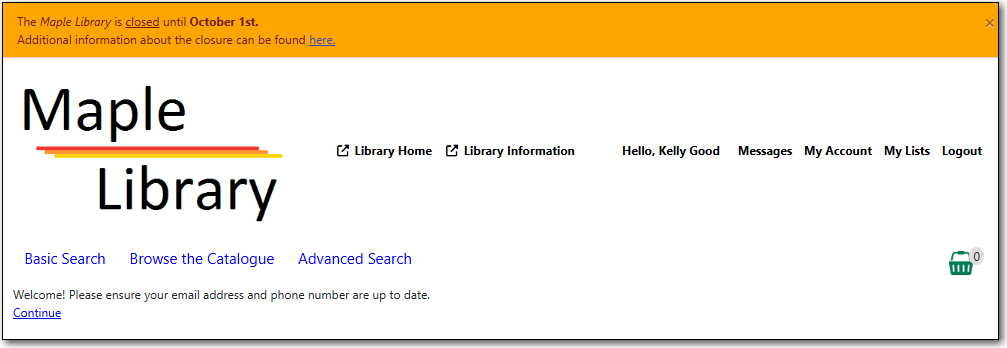
images/admin/opac-banner-customize-1.png

OPAC Alert Banner: Display

Can be set to TRUE to display the banner or FALSE to hide the banner.

OPAC Alert Banner: Type

The banner has four display options which change the text colour:

  • success
  • info
  • warning
  • danger

Note

Coop support recommends using "danger" for the best contrast.

OPAC Alert Banner: Text

Banner text can be formatted using HTML.

Table 64.1. HTML Text Formatting

Format Code

Bold

<b>hello</b>

Italic

<i>hello</i>

Underline

<u>hello</u>

Link

<a href="https://bc.libraries.coop">hello</a>

Line Break

hello<br>hello


OPAC Login Message

Sets a message to be displayed after logging in to My Account.

Copyright © 2008-2018, BC Libraries Cooperative