Table of Contents
There are three ways to access the Staff Catalogue.
Tip
The Staff Catalogue may also be accessed by pressing the F3 key any time while using Evergreen.
- On the splash page, enter a keyword into the text box in the Item Search and Cataloguing section.
Click Search Catalogue.
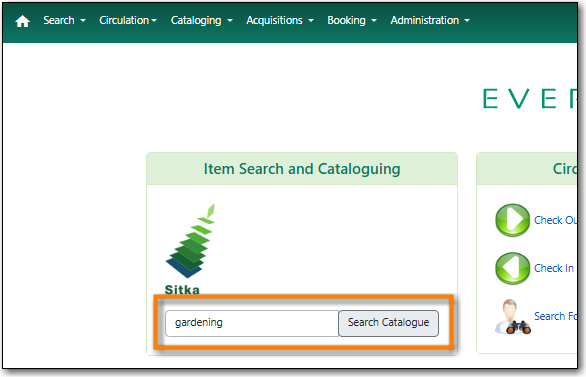
- The Staff Catalogue page opens with the results of the keyword search for your default search library.
- Perform your search. Refer to Chapter 16, Searching the Catalogue for information on searching in the staff catalogue.
Tip
You can change the default search library for the workstation in the Search Preferences.
Go to Search → Search the Catalog.
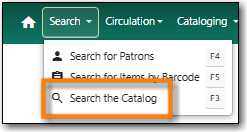
- The Staff Catalogue page opens.
- Perform your search. Refer to Chapter 16, Searching the Catalogue for information on searching in the staff catalogue.
Go to Cataloging → Search the Catalog.
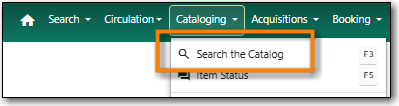
- The Staff Catalogue page opens.
- Perform your search. Refer to Chapter 16, Searching the Catalogue for information on searching in the staff catalogue.

