Search templates allow you to save search options and inputs for future use. You can create search templates using any search pane. Since the Keyword Search pane contains the most options, search templates are most useful on this pane.
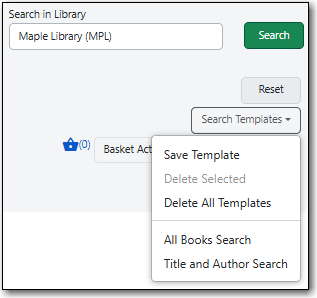
The search templates can be accessed by clicking Search Templates below the library selector in the top-right corner on the staff catalogue page.
To create a search template, first make all desired selections. You may make selections in the following fields:
- Format
- Catalog Field
- Matching
- Sort Results
- Language
- Audience
- Literary Format
- Shelving Location
Publication Year
Note
Checkbox selections will not be saved in a search template.
- You may also add additional search rows. If you use multiple search rows, you can make a selection in the Join With field.
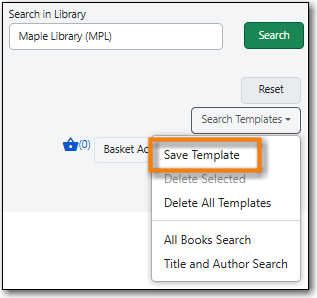
Click Search Templates → Save Template.
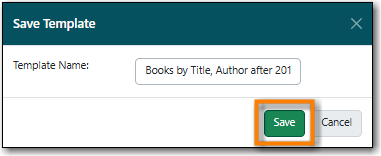
A pop-up will appear. Enter a brief, descriptive name and click Save.
Tip
Use unique names that describe the selected search settings when naming your search templates.
- The template will now appear in the drop down.
To use a saved template, click Search Templates located below the library selector in the top-right corner.
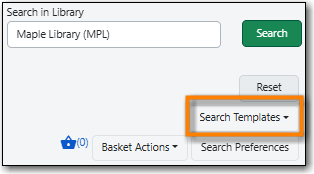
Select a template from the list in the drop down menu that appears.
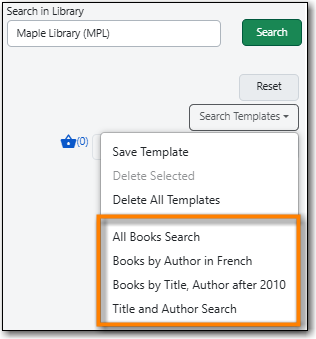
- The template will load and search criteria will be updated. You can now perform your search.
You can delete all your search templates at once or individual search templates.
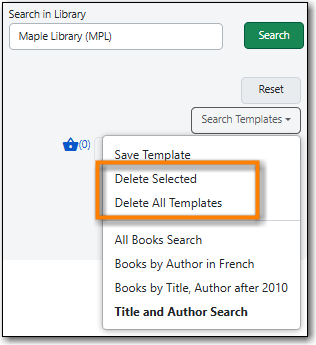
To delete an individual template:
- Click Search Templates located below the library selector in the top-right corner.
- Select the template you wish to delete.
- Click Search Templates again. The template you selected with now display in bold.
- Click Delete Selected.
- The Confirm Delete dialog box will open. Click Confirm.
- The template is deleted.
To delete all saved templates:
- Click Search Templates located below the library selector in the top-right corner.
- Click Delete All Templates.
- The Confirm Delete All dialog box will open. Click Confirm.
- All templates are deleted.

